- Cloud Native Applications
- Application Security
- Web Application Security
- Application Security Posture Management (ASPM)
- Microsegmentation
- Python Security
- SaaS Security
- Node.JS Security
- PHP Security
- AI in Cyber Security
- Cybersecurity for Financial Services
- The Principle of Least Privilege (PoLP)
- Identity and Access Management
- Cybersecurity in Banking
- Threat Detection and Response
- Cyber Kill Chain
- Threat Hunting
- Zero Trust Security
- Zero Trust Architecture
- Fileless Attacks
- DSPM
- Container Scanning
- Kubernetes
- Kubernetes
- Kubernetes Alternatives
- Kubernetes Namespace
- Kubernetes Architecture
- Kubernetes Cluster
- Kubernetes Nodes
- Kubernetes Pods
- Kubernetes Jobs
- Kubernetes Workloads
- Kubernetes Monitoring
- Kubernetes Security
- Kubernetes RBAC
- Secret Scanning
- Kubernetes Security Posture Management (KSPM)
- Kubernetes on AWS
- Kubernetes on VMware
- Kubernetes Vulnerability Scanning
- Managing Containers in Kubernetes
- K3s
- eBPF in Kubernetes
- Kubernetes Dashboard
- Kubernetes Operators
- Kubernetes Services
- Kubernetes Devops
- Kubernetes Networking
- Kubernetes ConfigMap
- Kubernetes Management
- Kubernetes Helm
- Kubernetes as a Service
- Kubernetes Serverless
- Kubernetes Tutorials
- Cloud Attacks
- Cloud Attacks
- Malware Attacks
- Zero Day Attack
- Top 10 Cyber Security Threats
- Arbitrary Code Execution
- Cryptojacking
- AI Attacks
- Prompt Injection
- Backdoor Attacks
- Reverse Shell Attack
- Remote Code Execution
- Defense Evasion
- Honeypots in Cybersecurity
- Malware Analysis
- AI Malware
- Lateral Movement
- Advanced Malware Protection
- CNAPP
- AI Security
- Container Platforms
- Containerized Architecture
- Docker Secrets
- Container Runtime Interface
- Container Images
- Image Scanning
- Container Compliance
- Docker Security Best Practices
- Container Security
- Container Security Best Practices
- Container Security Tools
- ECS Security
- Network Segmentation
- Istio security
- runC
- Service Mesh
- Image Repository
- Container Escape
- Container Runtime
- Docker Container
- OSS Container Image Scanning Tools
- What Is a Container?
- Docker Images
- Containerization 101
- VM vs. Container
- Containerization vs. Virtualization
- Containerized Applications
- Microservices and Containerization
- Registry Scanning
- Docker CVEs
- Docker Monitoring
- Securing Containers with Docker Scanning
- Docker CIS Benchmark
- Seccomp
- Docker Alpine
- Docker API
- Docker Tools
- 100 Best Docker Tutorials
- Docker Alternatives
- Docker Swarm
- Docker Containers vs. Virtual Machines (VMs)
- Docker Architecture
- Docker Networking
- Docker Registries
- Docker Orchestration
- OpenShift vs Docker
- Container Cloud Computing
- Container DevOps
- Docker in Production
- Container Monitoring
- Container Advantages
- Docker Hub
- Serverless Architecture
- Supply Chain Security
- Supply Chain Compliance
- SolarWinds Attack
- Supply Chain Security
- Secure Software Development Lifecycle
- Software Supply Chain Attacks
- Dependency Confusion Attack
- SLSA
- SSDF
- Software Composition Analysis
- Security Misconfigurations
- Repojacking
- Privilege Escalation
- CI/CD Security
- SAST Security
- GitLab Security
- GitHub Secret Scanning
- OWASP Dependency-Check
- Software Bill of Materials
- SBOM Tools
- NPM Vulnerabilities
- Log4j Vulnerability
- Text4Shell
- Secrets Management
- Jenkins Security
- Yarn vs. NPM
- Source Code Leaks
- Container Image Signing
- Open Source Licenses
- Vulnerability Management
- Vulnerability Management Tools
- Vulnerability Scanning Process
- Vulnerability Management
- Vulnerability Scanning
- Vulnerability Prioritization
- Open Source Vulnerability Scanning
- Vulnerability Remediation
- Vulnerability Scanner
- Risk-Based Vulnerability Management
- Vulnerability Exploitability eXchange (VEX)
- Malware Detection
- Fileless Malware
- Attack Vectors
- Malicious Code
- Risk Posture
- Alert Fatigue in Cybersecurity
- Cyber Security Posture
- MITRE ATT&CK
- MITRE ATT&CK Framework
- LLM Security
- Code Scanning
- Attack Surface
- Attack Surface Management
- What Are Indicators of Compromise (IoC)?
- Secure Code
- Configuration Drift
- Trivy
- DevSecOps
- DevSecOps
- DevSecOps Pipeline
- DevSecOps Best Practices
- DevSecOps vs SecDevOps
- Threat Modeling
- Mean Time to Repair (MTTR)
- eBPF Linux
- Cloud DevOps
- DevOps Tools
- GitOps vs DevOps
- Code Security
- Secure Code Review
- DevOps Security
- Infrastructure as Code (IaC) Security
- Infrastructure as Code DevOps
- Executive Order 14028 (U.S. Cybersecurity Executive Order)
- Open Source Security
- Shift-Left Security
- Shift Right Testing and Security
- What Is SecOps (Security Operations)?
- SecDevOps
- DevSecOps Tools
- Linux Security
- Rocky Linux
- Azure DevOps
- Cloud Security
- Cloud Security
- Cloud Security Challenges
- Cloud Security Tools
- Code to Cloud
- Cloud Protection
- Cloud Security Frameworks
- Cloud Security Standards
- Cloud Security Controls
- Cloud Security Posture Management (CSPM)
- AI Workloads
- Cloud Digital Forensics
- Cloud Computing Security Architecture
- What Is Enterprise Cloud Security?
- Virtualized Security
- CSPM Tools
- Vulnerabilities in Cloud Computing
- Top 7 Risks of Cloud Computing
- Cloud Security Assessment
- Cloud Visibility
- Cloud Governance
- Cloud Security Strategy
- Cloud Security Policy
- DFIR
- Cloud Workloads
- Public Cloud Security
- Private Cloud vs. Public Cloud
- Runtime Security
- Azure Cloud Security
- Azure Security Best Practices
- Azure Security vs. AWS Security
- AWS GovCloud: Basics & How It Compares to Azure & GCP
- S3 Security
- Cloud Misconfiguration
- Terraform Security
- Hybrid Cloud Security
- Multi-Cloud Strategy
- Agentless vs. Agent-Based Security & Monitoring
- Cloud Infrastructure Security
- Gartner CSPM
- Cloud Security Scanner
- AWS CIS Benchmark
- Cloud Configuration Management
- Cloud Workload Protection (CWP)
- Cloud Workload Protection Platforms (CWPP)
- Cloud Workload Security
- Cloud Vulnerabilities and Tools that Can Help
- Google Cloud Security
- Shared Responsibility Model
- AWS Shared Responsibility Model
- AWS Cloud Security
- Multi Cloud Security
- Cloud Compliance
- Kubernetes in Production
- Cloud Detection And Response
Terraform Security
What Is Terraform Security?
Terraform security refers to the set of practices and techniques used to ensure the security of Terraform infrastructure as code (IaC) deployments. Terraform is an open-source tool that enables organizations to automate the creation and management of infrastructure across multiple cloud providers and on-premises environments. As such, if your organization uses Terraform, Terraform security is an essential component of your security posture.
This is part of a series of articles about cloud security.
In this article:
- Terraform Security Risks
- Terraform Security Basics
- Terraform Authorization Model
- Terraform Threat Model
- Terraform Security Best Practices
- Execute Terraform Programmatically
- Only Use Safe Terraform Modules
- Secure the Data Store When Remotely Storing State Data
- Avoid Storing Secrets In State Files
- Use Terraform Security Scanners
Terraform Security Risks
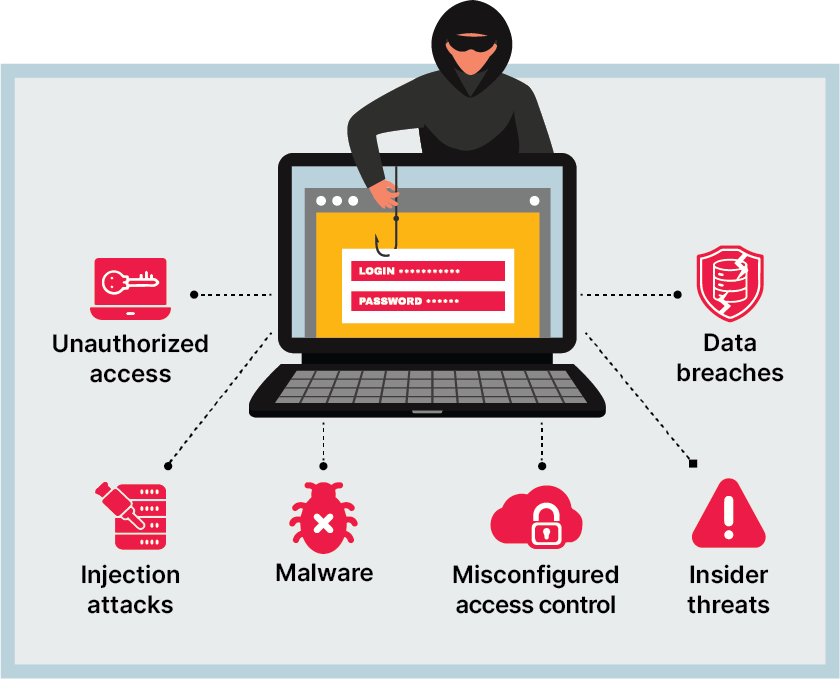
Like any tool used to manage infrastructure and data, Terraform has security risks and threats that organizations need to be aware of. Here are some common security risks and threats associated with Terraform:
- Unauthorized access: If an attacker gains unauthorized access to the Terraform infrastructure code or state files, they could modify or delete infrastructure resources, steal sensitive data, or cause other damage.
- Injection attacks: Terraform configurations may include input from external sources, such as user data or environmental variables. If an attacker is able to inject malicious code or commands into these inputs, they could cause damage to the infrastructure.
- Misconfigured access control: Misconfigured access control mechanisms can lead to unauthorized access to Terraform resources and sensitive data.
- Data breaches: Terraform state files may contain sensitive data, such as passwords, access keys, or other secrets. If these state files are compromised, it could result in a data breach.
- Malware: Malware or other malicious code could be introduced into the Terraform infrastructure code or state files, compromising the security of the infrastructure.
- Insider threats: Insider threats, such as employees or contractors with access to Terraform resources, could intentionally or accidentally cause damage to the infrastructure or compromise sensitive data.
Terraform Security Basics
Terraform Authorization Model
The Terraform authorization model governs access control and permissions within Terraform Cloud. It uses a role-based access control (RBAC) system to manage user access to workspaces, resources, and operations.
The RBAC system has pre-defined roles with specific permissions, which can be assigned to users, teams, or service accounts. The authorization model enables secure collaboration by ensuring that users have the appropriate permissions for their tasks, preventing unauthorized access, and maintaining a clear separation of duties.
Key components of the Terraform authorization model include:
- Organizations: Collections of users, teams, and workspaces.
- Teams: Groups of users with specific roles and permissions within an organization.
- Workspaces: Isolated environments where Terraform configurations are executed and managed.
- Roles: Pre-defined sets of permissions that can be assigned to users or teams.
Terraform Threat Model
The Terraform threat model outlines the potential risks and vulnerabilities that can impact the security of Terraform Cloud infrastructure. It helps in identifying, assessing, and addressing threats to ensure the confidentiality, integrity, and availability of resources.
Some common threats in the Terraform threat model include:
- Unauthorized access to resources or sensitive information.
- Leakage of secrets or sensitive data through misconfigurations or insecure storage.
- Infrastructure tampering, leading to unapproved changes or unauthorized deployments.
- Denial of Service (DoS) attacks, affecting the availability of resources.
To mitigate these threats, Terraform Cloud implements security best practices such as:
- Encryption of sensitive data, both in transit and at rest.
- Secure storage of secrets and sensitive information using Vault or other secret management solutions.
- Monitoring and auditing of infrastructure changes, with detailed logs to track user activities and identify potential security incidents.
- Integration with external identity providers (e.g., SAML, OAuth) for secure user authentication and access management.
Terraform Security Best Practices
Execute Terraform Programmatically
Running Terraform commands manually can be error-prone, as it relies on individuals remembering the correct sequence of commands and parameters. Automating Terraform execution using CI/CD pipelines:
- Provides a consistent and repeatable process for deploying infrastructure changes.
- Enforces version control, ensuring all changes are tracked and can be easily rolled back.
- Facilitates code reviews and approval processes, minimizing the risk of introducing vulnerabilities or errors.
- Ensures access to the infrastructure is restricted to authorized personnel.
Popular CI/CD tools that can be used to automate Terraform execution include Jenkins, GitLab CI/CD, GitHub Actions, and CircleCI.
Only Use Safe Terraform Modules
Terraform modules allow you to encapsulate common infrastructure components into reusable units of code. When using modules:
- Verify the source: Ensure the module comes from a reputable and trusted source, like the Terraform Registry or your organization’s private registry.
- Review third-party modules: Perform a thorough code review to ensure the module adheres to security best practices and doesn’t introduce vulnerabilities or undesired behavior.
- Version pinning: Pin the module version to a specific release to prevent unexpected changes when the module is updated.
Secure the Data Store When Remotely Storing State Data
Terraform state files store information about your infrastructure’s resources and configuration. Storing these files remotely in a secure backend, such as Terraform Cloud or AWS S3, ensures that they are encrypted, versioned, and protected from unauthorized access. Configure the backend to use strong access controls, and enable versioning and state file locking to prevent conflicts and accidental deletion.
Avoid Storing Secrets In State Files
Sensitive information like passwords, API keys, and tokens should not be stored in plain text in Terraform configurations or state files. To manage secrets securely:
- Use secret management solutions: Tools like HashiCorp Vault, AWS Secrets Manager, or Azure Key Vault provide secure storage and access control for sensitive data.
- Leverage Terraform providers and data sources: Fetch secrets during runtime and pass them to resources without storing them in the state file.
- Use encryption functions: If you must store secrets in the state file, use built-in encryption functions like pgp or kms to encrypt the data.
Use Terraform Security Scanners
A Terraform security scanner is a tool that analyzes Terraform infrastructure code and identifies potential security issues and vulnerabilities. These scanners are designed to identify security risks and threats in Terraform code, such as misconfigured access control, injection attacks, data breaches, and malware.
Terraform security scanners use a variety of techniques to analyze infrastructure code, including static analysis, pattern recognition, and machine learning. These techniques can identify patterns and structures in Terraform code that are associated with common security issues and vulnerabilities.
The output of a Terraform security scanner typically includes a list of potential security issues and vulnerabilities, along with recommendations for how to remediate these issues. For example, a scanner may recommend that an organization improve access control by implementing RBAC policies, or that sensitive data be encrypted and stored securely.
Terraform security scanners can be run as part of a CI/CD pipeline or as a standalone tool, depending on the needs of the organization. Some Terraform security scanners are available as open-source tools, while others are offered as commercial products with additional features and support.
- 7 Dimensions of Cloud Security, Top 10 Risks and How to Defend
- Top 7 Cloud Security Challenges and How to Overcome Them
- Cloud Security Tools
- What Is Code to Cloud Security?
- Cloud Protection: Why, How & 6 Essential Technologies
- Cloud Security Frameworks
- 10 Cloud Security Standards You Must Know About
- Cloud Security Controls
- What Is Cloud Security Posture Management (CSPM)?
- What Are AI Workloads?
- What Is Cloud Computing Forensics?
- Cloud Computing Security Architecture: 5 Key Components
- What Is Enterprise Cloud Security?
- Why Is Security Important for Virtual Machines and Other Virtualized Resources?
- CSPM Tools: Going Beyond Cloud Vendor CSPM Solutions
- Top 5 Threats & Vulnerabilities in Cloud Computing
- How Secure Is Cloud Computing?
- Cloud Security Assessment: 8-Step Process and Checklist
- Cloud Visibility
- 3 Pillars of Cloud Governance, Challenges & Best Practices
- Building a Cloud Security Strategy in 2023
- 9 Key Components of a Cloud Security Policy
- DFIR (Digital Forensics and Incident Response)?
- Cloud Workloads: Types, Common Tasks, and Security Best Practices
- Public Cloud Security: The Basics & 7 Ways to Secure Your Cloud
- Private Cloud vs. Public Cloud: 7 Key Differences and How to Choose
- Why Runtime Security is Essential to Cloud Security
- Azure Cloud Security: An Introduction
- 8 Critical Azure Security Best Practices
- Azure Security vs. AWS Security
- AWS GovCloud: Basics & How It Compares to Azure & GCP
- S3 Security: Build-In Security Features and 4 Critical Best Practices
- What Is Cloud Misconfiguration?
- What is Hybrid Cloud Security?
- Multi-Cloud Strategy: Why It’s Critical and 4 Challenges to Address
- Agentless vs. Agent Based Security & Monitoring: How to Choose?
- Cloud Infrastructure Security: Securing the 7 Key Components
- How Gartner Defines CSPM and 3 Tips for Success
- Cloud Security Scanner: What do Amazon, Azure and GCP Provide?
- What Is the AWS CIS Benchmark?
- Cloud Configuration Management
- Understanding Cloud Workload Protection (CWP)
- What Is a Cloud Workload Protection Platform (CWPP)?
- Cloud Workload Security: Risks, Controls, and 10 Best Practices
- Top 6 Cloud Vulnerabilities and Tools that Can Help
- Google Cloud Security: How It Works and 10 Security Best Practices
- Cloud Shared Responsibility Model: Examples & Best Practices
- What Is the AWS Shared Responsibility Model?
- AWS Cloud Security: The Complete Guide
- What Is Multi-Cloud Security?
- Show more
Aqua Cloud Native Application Protection Platform (CNAPP)
Go cloud native with the experts!