Cloud Native Landscape: The 6 Categories in Depth
Learn about the Cloud Native Landscape, which lists hundreds of cloud native technologies in six broad categories.
What Is the CNCF Landscape?
The Cloud Native Landscape project attempts to compile, categorize, and organize all open source projects and proprietary products that can benefit cloud native applications. The Cloud Native Computing Foundation (CNCF) maintains the cloud native landscape project. The project offers:
- A cloud native landscape map—an interactive map that consolidates all cloud native offerings and provides information about each category, product, and project. Check out the interactive map, shown below.
- A cloud native trail map—an infographic that illustrates and explains a recommended process for implementing cloud native technology.
- A cloud native landscape guide—an online resource that explains the cloud native landscape map and defines six key categories.
The Cloud Native Landscape includes six categories, which we will describe in depth: Provisioning, Runtime, Orchestration, Observability, and Platform.
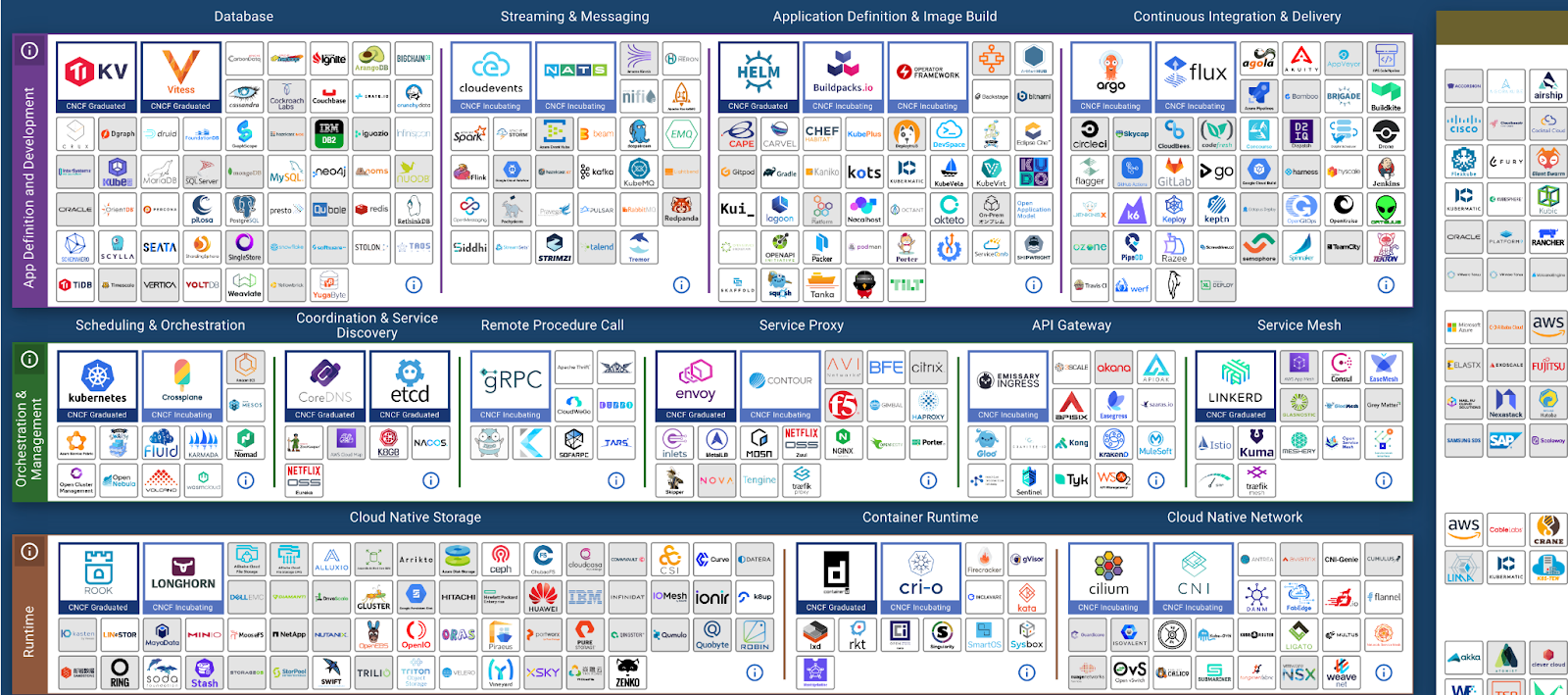
Source: CNCF
In this article:
What Are the 6 Categories of the Cloud Native Landscape?
Here are the six categories of the CNCF cloud native landscape:
- Provisioning—includes tools required for the foundational infrastructure upon which the cloud environments and supporting technologies will function.
- Runtime—includes tools necessary to run containers in cloud native environments.
- Orchestration & Management—includes the tools necessary to orchestrate and manage containers, applications, and resources.
- App Definition & Development—includes tools that enable applications to send and store data and tools needed to build and deploy applications.
- Observability & Analysis—includes tools that help monitor applications and alert stakeholders of any issue.
- Platforms—includes platforms that bundle multiple functionalities and tools. These platforms help configure and fine-tune multiple tools to help organizations more easily adopt cloud native technologies.
Related content: Read our guide to cloud native architecture
History of the Cloud Native Computing Foundation (CNCF)
The CNCF was founded in 2015 by Google and the Linux Foundation to help advance container technologies and align the technology industry around the evolution of this new field.
Kubernetes is the first project that joined the CNCF. Initially created by Google for internal use, Borg (the project’s original name) developed and used the technology to orchestrate containers. When Google open-sourced the project, it was rewritten in Go, renamed Kubernetes, and donated to the CNCF.
Kubernetes was only the beginning. Soon, a wave of technological advancements ensued, and many other cloud native projects joined the CNCF. In 2016, a program was announced to establish qualified representatives of all technologies governed by the CNCF. Today, more than 450 member organizations support the CNCF.
CNCF Landscape Categories in Depth
Provisioning
The provisioning category is the foundation of cloud native applications. It includes tools used to create, configure, manage, and secure cloud native infrastructure and to manage container images. Types of tools in this category include:
- Automation and Configuration—enabling rapid deployment of cloud native computing resources.
- Container Registry—storing container images and allowing other tools to load them and use them to run containers.
- Security & Compliance—providing scanning, monitoring, and other capabilities to secure cloud native environments and workloads.
- Key Management—managing passwords, credentials, and secrets in microservices applications.
Related content: Read our guide to cloud native infrastructure
Runtime
The runtime category includes tools that can be used to run a container and associated resources, such as persistent storage and networking. Types of tools in this category include:
- Container Runtime—tools associated with running containerized applications and managing their lifecycle. Notable tools include Docker, containerd, and CRI-O.
- Cloud Native Storage—providing persistent storage for containers and creating standard interfaces for storage devices.
- Cloud Native Network—overlaying a virtual network over the physical network, allowing containers to communicate.
Orchestration & Management
The Orchestration & Management category makes it possible to manage cloud native applications at scale. Types of tools in this category include:
- Scheduling & Orchestration—enabling management, resource scheduling, and automation of containerized workloads. The leader in this category is Kubernetes.
- Coordination & Service Discovery—enabling containers and tools to discover and communicate with elements in a cloud native environment.
- Remote Procedure Call—providing a communication transport within cloud native clusters.
- Service Proxy—intercepting and forwarding traffic between services.
- API Gateway—managing API communication between end-users and a cloud-native application and between microservices.
- Service Mesh—managing ingress traffic and communication between services, adding reliability and observability in a way that is service-aware.
App Definition & Development
The app definition category involves technologies that help plan, develop, and roll out cloud native applications. Types of tools include:
- Database—data stores that can integrate with cloud native infrastructure or are, themselves, cloud native.
- Streaming & Messaging—middleware that enables service-service communication.
- Application Definition & Image Build—tools that support the container developer experience.
- Continuous Integration & Delivery (CI/CD)—tools that manage the development pipeline and enable fast, automated deployment of new releases.
Observability and Analysis
The observability and analysis category focuses on giving teams insight into what is happening in a cloud native environment and identifying issues that need attention. Cloud native environments are complex and it can be difficult to see what is running and how it is performing. Tools in this category include:
- Monitoring—enabling instrumentation of applications, collecting key metrics, visualizing them, and using them to create alerts and reports.
- Logging—collecting and centralizing operational data and errors from cloud native components.
- Tracing—following the path of a request in a distributed system, to enable troubleshooting.
- Chaos Engineering—intentionally creating faults to see how a distributed system behaves and verify resilience.
Platform
The platform category includes complete solutions that package cloud native technology into a form companies can readily use. Instead of building cloud native applications yourself based on open source projects, you can use a complete solution that addresses multiple aspects of the application. Types of tools in this category include:
- Certified Kubernetes—Distribution—a special distribution of Kubernetes created by a vendor. A notable tool in this category is Red Hat OpenShift.
- Certified Kubernetes—Hosted—managed Kubernetes platform that takes the pain out of installing and managing Kubernetes clusters. Notable tools are Google Kubernetes Engine, Amazon Elastic Kubernetes Services, and Azure Kubernetes Service.
- Certified Kubernetes—Installer—tools that automate installation and configuration of Kubernetes, either on your own infrastructure or managed infrastructure.
- PaaS/Container Service—a fully managed service used to run container applications, typically including container orchestration. A notable example is Heroku.
CNCF Cloud Native Trail Map
The Cloud Native Trail Map illustrates a recommended cloud native adoption journey consisting of ten steps and tools, including:
- Containerization—the cloud native journey begins with packaging your application and its dependencies into containers.
- CI/CD—the next step is to implement a continuous integration (CI) and continuous delivery (CI/CD) pipeline that automates code rollouts and testing and streamlines the creation of new containers.
- Orchestration and application definition—orchestration tools help automate tasks. Kubernetes is currently the most popular orchestration platform.
- Observability and analysis—cloud native environments need tools that assist in monitoring, logging, and tracing the progress of each application. The CNCF recommends using Prometheus, an open source monitoring project.
- Service proxy, discovery, and mesh—the goal of service discovery is to minimize manual configuration tasks. The CNCF recommends using CoreDNS for service discovery and Linkerd and Envoy to support service mesh architectures.
- Networking and policy—to extend control and functionality over networking and policies, the CNCF recommends using Calico or Weave Net. Both are compliant with the container networking interface (CNI).
- Distributed database and storage—to support cloud native applications, enterprises should run databases at a greater scale. The CNCF recommends Vitess, a clustering system designed for MySQL databases.
- Streaming and messaging—this step involves establishing high-performance streaming and messaging. For this purpose, the CNCF recommends using the universal remote procedure call (RPC) framework gRPC. Alternatively, you can use NATS, a multi-model messaging system.
- Container registry and runtime—the CNCF recommends using rkt, containerd, Harbor to sign, store, and serve container images.
- Software distribution—enterprises that require a secure software distribution can use tools like Sigstore or Notary, which help establish high levels of trust for digital content.
How to Join the Cloud Native Landscape Map
Here are the requirements that projects and products must meet in order to join the cloud native landscape map:
- Cloud native projects.
- A minimum of 300 GitHub stars.
- The project must clearly fit into an existing category.
- Each project or company must include a logo that includes the product name.
The CNCF fits each product in one box that best represents its main value proposition. Occasionally, the CNCF may allow large companies to enter several boxes, but they are unlikely to create a new category.
Generally, the CNCF does not include commercial versions of open source projects, but they do show all Certified Kubernetes implementations. A Crunchbase organization must apply as the organization that controls the software—typically the trademark owner.
You can open a pull request to add your project to landscape.yml. You can add your logo in SVG format to the hosted_logos directory and reference it there.
Cloud Native Security with Aqua
Aqua Security is keenly focused on helping organizations and technical contributors to maximize their security risk posture as they develop and deploy cloud native applications. Aqua works closely with the CNCF, and other innovative communities, to engender cloud native security best practices. As part of this effort, Aqua maintains a suite of open source security tools, and provides the industry’s leading commercial cloud native application protection platform (CNAPP).
If you would like to evaluate your own cloud native security preparedness for free, complete this short, 5-minute Cloud Native Self Assessment. This will help you to identify your cloud native security strengths and strategic opportunities for improvement, along with helpful resources to accelerate the process.
Aqua Cloud Native Application Protection Platform (CNAPP)
Go cloud native with the experts!