Azure Red Hat OpenShift
Learn about Azure Red Hat OpenShift, how it compares to Azure Kubernetes Service (AKS), government use cases, and security best practices.
What Is Azure Red Hat OpenShift?
Azure Red Hat OpenShift is an enterprise-grade container platform based on Kubernetes. It runs Kubernetes nodes on Azure virtual machines (VMs).
External tools and plugins are essential for many actions in Kubernetes, including image registry management, storage, networking, logging, and monitoring. Containerized application development requires tight integration with databases, middleware, and CI/CD tools. Azure Red Hat OpenShift provides all these functions in a unified platform.
Red Hat and Microsoft jointly support Azure Red Hat OpenShift, handling VM operation, patching, updating, and monitoring tasks. Customers deploy OpenShift clusters under their Azure subscriptions, with all costs covered by their Azure bill. They can also customize their registries, storage, and networking solutions or use built-in offerings to automate application builds, scaling, deployments, and source code management.
With Azure Active Directory, users can benefit from an integrated sign-in experience for Azure Red Hat OpenShift. It provides security management, health monitoring, service level agreement (SLA) guarantees, and connectivity between nodes/pods and storage.
In this article:
OpenShift 4 on Azure Red Hat OpenShift
OpenShift 4 extends Azure Red Hat OpenShift, offering the following functionality:
Supports cluster-admin roles
OpenShift 4 supports cluster-admin roles that offer entire cluster customization abilities, allowing you to install CRDs and run privileged containers.
Auto scaling
OpenShift 4 performs Kubernetes auto scaling by employing the MachineAutoscalers and Cluster Autoscaler. It helps expand or reduce cluster size to meet current demand.
Provides high levels of resilience
OpenShift 4 deploys cluster components over three Azure AZs in specific Azure regions. It provides high availability for highly demanding and mission-critical applications and data. Additionally, Azure Red Hat OpenShift offers an SLA of 99.9%.
Compliance certifications
Azure has a large compliance portfolio that provides various offerings and customer-facing services. Azure Red Hat OpenShift is FedRAMP High, HITRUST, and PCI DSS certified.
Identity provider options
OpenShift 4 lets you use your identity provider. It supports authentication and authorization via Azure Active Directory (Azure AD), allowing users to use their supported identity provider. For example, you can set this up using OAuth2 or OpenID Connect.
Supports Azure Monitor
OpenShift 4 lets you use Azure Monitoring for clusters hosted on various locations, including Azure Red Hat OpenShift, OpenShift Container Platform on Azure, or on-premise.
Supports API endpoints and private ingress
OpenShift 4 lets you choose between private or public cluster management (API) or ingress endpoints. You can use Azure Express Route and private endpoints to enable private hybrid clusters.
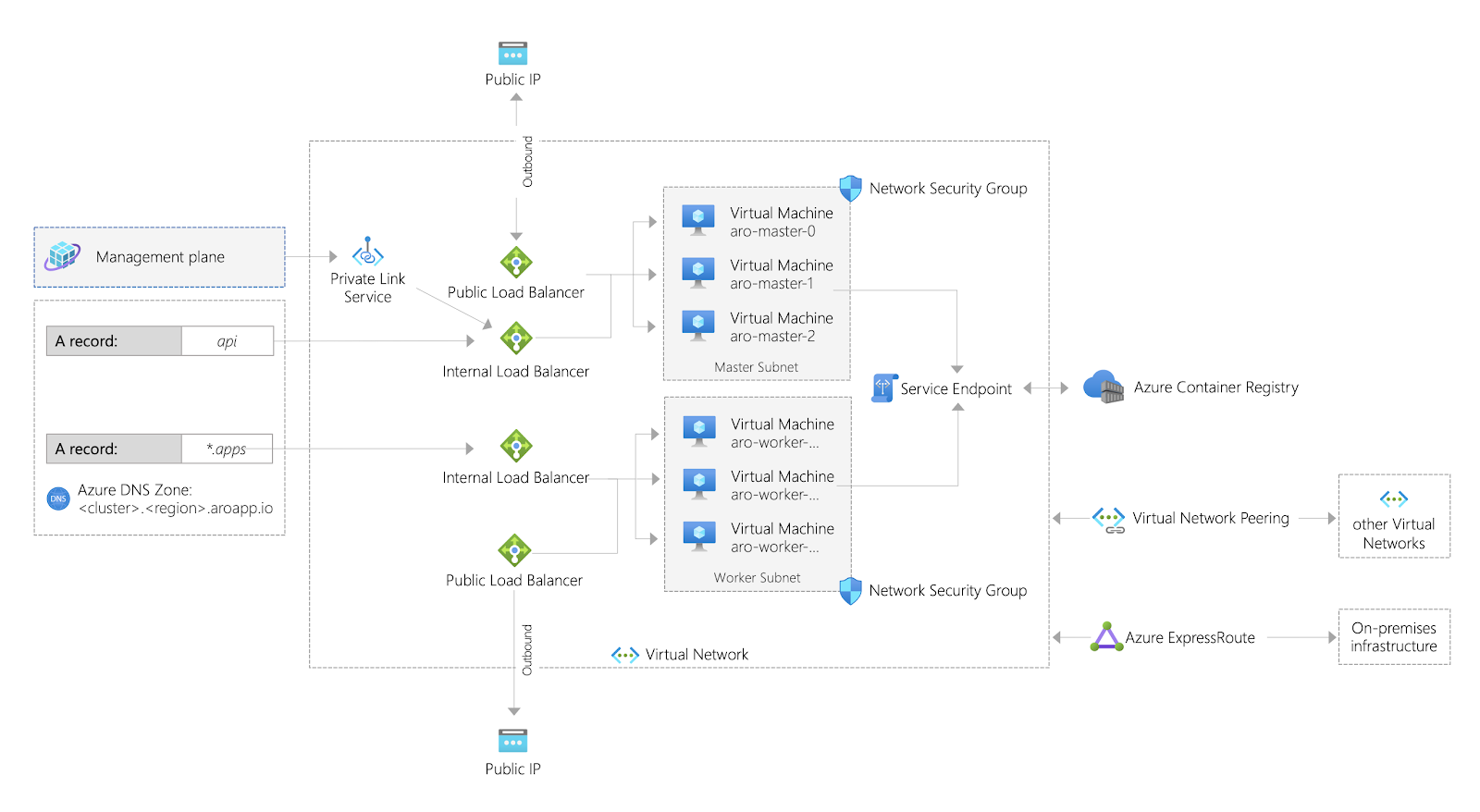
Image Source: OpenShift
Azure Red Hat OpenShift for US Government Agencies
Azure Red Hat OpenShift on Microsoft Azure for US Government is a specialized offer that provides the required level of IT security and data management for US government agencies. This allows government agencies more stringent access control, more control over data locations, and the tools necessary to comply with regulatory requirements.
The service is compliant with all relevant compliance tests including Department of Defense (DoD) Impact Level (IL) 4, Department of Defense IL 5, and FedRAMP High Authorization.
The service provides features tailored to meet the information security requirements of sensitive workloads, including:
- Egress Lockdown—ability to access the necessary cluster resources over a private link service without traffic leaving the cluster.
- Compute Isolation—enables isolating virtual machines (VMs) that handle sensitive workloads to meet compliance and regulatory requirements. This feature ensures only one VM runs on a specific server instance, allowing customers to deploy isolated compute worker nodes directly into their Azure environment.
- Spot nodes—customers can purchase unused Azure capacity at a substantial discount and use it for OpenShift worker nodes.
- L series VMs—support for VMs optimized for storage-intensive workloads.
- Red Hat Advanced Cluster Security for Kubernetes—supports application security best practices from the onset of the development lifecycle, shifting security to the left. This service enforces strict security requirements to workloads from the moment they are introduced into the cluster.
Securing Azure Red Hat OpenShift Clusters
Hardening OpenShift Cluster and Nodes
Here are some important ways you can harden your OpenShift cluster:
Encrypting etcd
etcd is the central data store for state and configuration of Kubernetes cluster. The OpenShift Container Platform does not encrypt the data in etcd at rest by default. You can enable etcd encryption in the cluster to add a layer of data security and prevent data loss in the event of a malicious actor gaining access to the etcd backup. OCP recommends using etcd backups for all upgrades, so etcd encryption should be standard organizational practice.
Installing a CSO
OpenShift lets you install a Container Security Operator (CSO) in your cluster. The CSO scans the container registry to identify vulnerabilities in each image it provides, can perform benchmarking, and enforce assurance policies. A CSO can secure any container images that launch pods in your cluster, or focus on pods in specific namespaces.
A CSO can also find vulnerabilities based on the time since the last patch or upgrade for a container. You can view its findings via the OpenShift Container Platform dashboard, which provides an overview of the cluster’s health and alerts you to images requiring attention.
Logging events
To maintain an audit trail, you should log all changes and events at the node and OpenShift levels. These logs are essential to evaluate cluster security and understand the attack path in the event of a breach. Audit logs are a default feature in OpenShift, which you may easily access via the command line. Logging is especially important for restricted clusters that don’t view the cluster logs using the web interface.
OpenShift lets administrators view audit logs directly from the API and node using the command line. OpenShift logs and stores cluster events using Fluentd and Elasticsearch. Ensure you leverage these open source debugging tools to secure your cluster.
Encrypting with Azure-managed keys or host-based encryption
OpenShift clusters use VMs with OS disks encrypted by Azure-managed auto-generated keys. It is the default setting. You can also deploy an ARO cluster to encrypt OS disks with self-managed keys. This option provides more control over confidential data.
Azure stores customer-managed keys in an Azure Key Vault. It also defines a default storage class for clusters with customer-managed keys. As a result, your data disks and OS disks are both encrypted by these keys.
You can also use host-based encryption. In this case, Azure encrypts data at rest—stored on the VM host of your ARO agent nodes’ VMs—and data flowing to a Storage service. It means:
- The system encrypts temp disks at rest with platform-managed keys.
- The system encrypts the cache of OS and data disks at rest. It can apply platform-managed keys or customer-managed keys according to the encryption type specified on these disks.
Using Azure Active Directory Authentication
Azure AD offers various authentication mechanisms that go beyond basic username and password authentication. Azure AD authentication mechanisms include passwordless authentication, multi-factor authentication (MFA), and self-service password reset. It also offers hybrid integration to enable:
- Writing password changes to your on-premises environment
- Enforcing password protection policies for your on-premises environment
In addition to protecting accounts and systems, Azure AD helps protect user identities and improve their sign-in experience through single-sign-on (SSO) and self-service password reset.
Monitor Cluster Activity with Container Insights
You can use Container Insights to monitor Azure Kubernetes Service (AKS) and AKS engine clusters. The service also enables monitoring for Kubernetes clusters hosted on OpenShift 4. It offers a multi-cluster view that highlights OpenShift clusters under an Unmonitored clusters tab—clusters listed here do not have monitoring enabled.
Here is how you can enable monitoring:
- Go to the Azure portal and sign in to your account.
- On the home page or the left pane, find and choose Azure Monitor.
- Go to the Insights section, and choose Containers.
- Go to the Monitor—containers page, and choose Unmonitored clusters.
- Find the list of unmonitored clusters, choose a cluster, and select Enable.
OpenShift Security with Aqua
ARO is a highly secured platform that enforces security at every level of the cloud-native stack. However, the security shared responsibility model places the management of the application security within the customer realm of responsibilities. Customers are tasked with handling vulnerability management, compliance, and runtime security of the applications they deploy to ARO.
For ARO deployments. Aqua extend OpenShift’s native capabilities to provide:
- Risk-driven vulnerability management and malware identification for CI/CD pipeline to secure the software supply chain
- Cloud security posture management for Azure and hybrid cloud security
- Granular runtime protection and monitoring to stop attacks
- Comprehensive infrastructure risk visibility, assurance & compliance
Certified Red Hat OpenShift operators for Aqua Cloud Native Security Platform allow you to install and configure the platform more easily.
The following are the core security capabilities that Aqua provides for customers building and deploying applications on ARO:
- Container image scanning for malware, secrets, and vulnerabilities in the CI/CD pipeline. Integrates with all common registries, such as Red Hat Quay, ACR (Microsoft Container Registry), JFrog, Artifactory and Harbor.
- Scan and monitor your cloud services, Infrastructure-as-Code templates, and Red Hat OpenShift cluster configurations for compliance with policies, best practices, and standards, including Center for Internet Security (CIS) benchmarks.
- Use actionable guidance, alerts, and automation to remediate misconfig ured services and resources before vulnerabilities are exploited..
- Secure build automation with persistent image assurance policies and controls to prevent unapproved or unvetted images from running
- Enforce and monitor configurations and best practices for OpenShift Kubernetes and check for potential unsafe security configurations, whether in your cluster, node or pod.
- Runtime protection for OpenShift Container Platform. Detect, prevent unapproved changes to running containers and pods
- Container firewalling and micro-segmentation discovers network connections and automatically suggests service identify-based firewall rules to whitelist permitted connections between containers, functions, and VMs
- Improve compliance auditing, regulatory reporting, and event forensics with logging for access attempts, network access, running executables, and privilege escalations
Aqua Cloud Native Application Protection Platform (CNAPP)
Go cloud native with the experts!