What Is Mean Time to Repair (MTTR)?
It's challenging to excel at cybersecurity if you lack a means of measuring how quickly your teams are able to detect, respond to, recover from, and resolve security issues. This is why MTTR – a type of metric that can refer to all of these processes – is a critical data point to track in the context of cybersecurity.
To provide guidance on how to factor MTTR into your cybersecurity strategy, this article explains what MTTR means, why it’s important, different types of MTTR, and how to make the most of MTTR in modern security operations.
In this article:
- What is MTTR?
- Types of MTTR
- Mean Time to Repair
- Mean Time to Recover
- Mean Time to Respond
- Other MTTR-related metrics
- How to work with and calculate MTTR
- MTTR calculation example
- Calculating median vs. mean MTTR
- Possible challenges in MTTR calculation
- How to interpret MTTR – and what makes an MTTR “good”?
- How to improve MTTR
- Reducing MTTR with Aqua
What is MTTR?
MTTR refers to a series of metrics that can be used to measure how quickly teams manage technical issues. As we explain in the following section, there are multiple types of MTTR, and they focus on somewhat different areas of operation – response time, recovery time, and repair or resolution time. But at a high level, all of these metrics are proxies for tracking the efficiency of operations.
The goal of MTTR is to help organizations track their effectiveness at managing cybersecurity issues. MTTR is important because poor MTTR rates reflect an inability of cybersecurity and IT teams to react quickly to threats and risks. By extension, bad MTTR metrics correlate with higher rates of attack.
This is because the longer a risk or threat remains active, referred to as Dwell time, the greater the likelihood that it will lead to a breach. For example, if your container vulnerability scanners reveal an unpatched vulnerability, the affected container remains wide open to attack until you repair the issue by applying a patch (or, if that’s not possible, taking other steps to prevent attackers from exploiting the vulnerability).
Of course, every security risk or threat is different, and it’s natural for some repair, response, and recovery efforts to take longer than others. However, by tracking overall MTTR rates, organizations can gain insight into the general effectiveness of their cybersecurity detection and response strategies.
Note that this article focuses on MTTR in cybersecurity, but the MTTR concept also applies to other aspects of IT – such as managing the reliability of software systems. There, too, the ability to identify and respond to issues quickly is important for guaranteeing the best possible user experience and minimizing risks to the business.
“Only 30% of the respondents are able to resolve critical security incidents in 12 hours or less, meaning 70% of critical incidents take longer than 12 hours to resolve” – State of Application Security Report 2024, CrowdStrike
Types of MTTR
As we mentioned, MTTR can refer to three different types of metrics: Response time, recovery time, and repair or resolution time. Although these are closely related, they each focus on different aspects of cybersecurity operations.
Mean Time to Repair
Mean Time to Repair is what people most often mean when they refer to MTTR. Mean Time to Repair (which is synonymous with Mean Time to Resolve) refers to how long it takes to repair or resolve an issue definitively.
For example, if a team spends two hours patching an application to close a security vulnerability, the time to repair or resolve the issue is two hours. If it takes three days between when you first discover a breach and when you remove the intruders and remediate the issue that allowed them in, your time to repair was three days.
Mean Time to Recover
Mean Time to Recover focuses on how long it takes to restore an affected system to full functionality following an incident. This can be different from Mean Time to Repair because in some cases, a system may not be brought back online until some time after a team finishes fixing the security issue that affected it.
For instance, imagine that one of your servers is breached. It might take your team a day to repair the vulnerability that enabled the breach. But it might take an additional day for them to restart the server and restore all of its services so that it operates normally. In this case, time to repair would be one day, but time to recover would be two days.
Mean Time to Respond
In some cases, MTTR can refer to Mean Time to Respond. This is the interval between when a security issue first appears and when your team begins responding to it.
For example, imagine that threat actors breach a server, but that it takes your team a week to detect their presence and begin responding. The time to respond would be a week in this case.
Other MTTR-related metrics
MTTR is only one of many metrics that organizations can use to assess the effectiveness of their cybersecurity strategies. Other types of relevant calculations include:
- MTTF: Mean Time to Failure, which measures how long it takes, on average, for cybersecurity issues to arise within resources after deployment.
- MTTD: Mean Time to Detect, or how long it takes to detect risks. This is closely related to Mean Time To Respond, although in some cases there may be a delay between when a team detects an issue and when it initiates a response.
- MTTA: Mean Time To Acknowledge, or how long it takes to acknowledge an issue after automated tools have reported it. This also relates closely to Mean Time to Respond, but acknowledging an incident or risk doesn’t mean that response has begun.
- MTBF: Mean Time Between Failures, which tracks how much time typically passes between the detection of security risks or threats. In complex, large-scale environments where new security challenges appear almost continuously, MTBF tends to be low.
Note as well that although MTTR typically focuses on mean (or average) time intervals, medians can also be used when calculating MTTR and related metrics. Determining median repair, recovery or response may provide a more accurate assessment of cybersecurity effectiveness for organizations that typically manage issues efficiently, but that occasionally experience outliers in their ability to detect or mitigate risks and threats.
How to work with and calculate MTTR
Calculating MTTR is relatively straightforward. The key steps include:
- Determine which type of MTTR you want to measure: Do you want to track average repair, recovery, or response times?
- Calculate total time spent on the activity: Determine how many total hours your organization spends within a given time period on incident repair, recovery, or response.
- Divide total time spent by the number of incidents: This calculation is your mean, or average, repair, recovery, or response time.
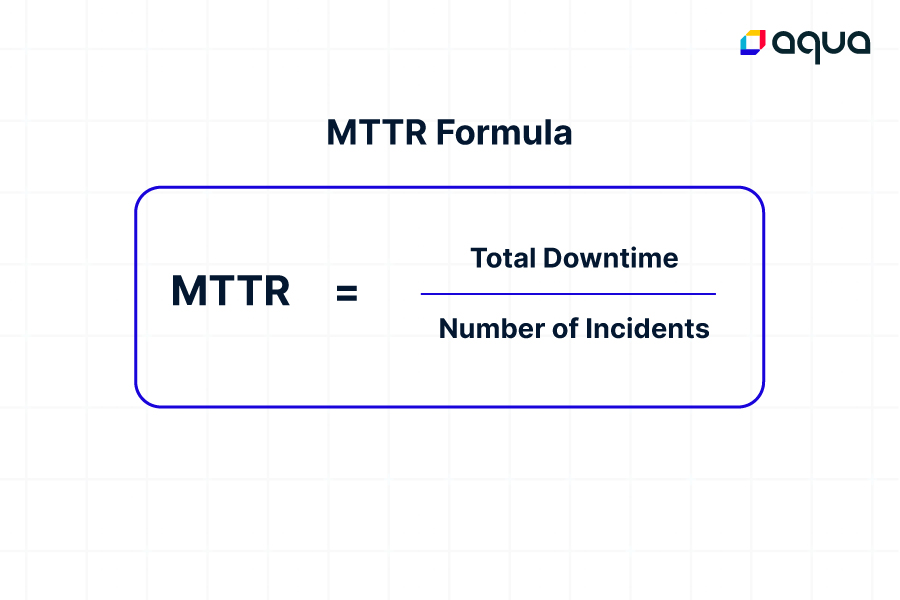
You can perform these calculations using the following formula:
Total time spent / total number of incidents = MTTR
MTTR calculation example
As an example, imagine that you want to calculate Mean Time to Repair based on the following data points:
- Over the course of a month, your team spent 98 hours total remediating security issues.
- The number of issues they remediated in the month totaled 12
In this case, MTTR would be 98/12, or 8.17 hours. This is the average number of hours that your organization spent repairing each incident over the course of the month.
Calculating median vs. mean MTTR
Note that if you wanted to calculate Median Time to Repair instead of Mean Time to Repair, you would need to track the number of hours your team spent on each individual incident, and then sort them to determine median repair time. If most incidents took about 2 hours to repair, for instance, your Median Time to Repair would be 2 hours, even if you had some outlying incidents that required much more time to mitigate.
Median Time to Repair is a more complex calculation that necessitates more granular data about incident response times, which is part of the reason that organizations tend to track repair, recovery, and response times based on means instead of medians.
Possible challenges in MTTR calculation
Although the formula for calculating MTTR is simple, getting the data you need to make an accurate MTTR calculation can be challenging for several reasons:
- You may not always be sure when a risk or threat first emerged, making it impossible to say how long it took to fix it.
- It’s not always clear when a risk has been fully remediated.
- What counts as a response can vary from one type of incident to another.
- Teams don’t always systematically track how long they spend identifying and remediating risks.
These challenges mean that MTTR calculations are often imperfect. But that’s okay. As long as your methodology for collecting and processing MTTR metrics remains consistent, MTTR will be effective in allowing you to gain an overall assessment of your organization’s ability to manage risks.
How to interpret MTTR – and what makes an MTTR “good”?
There’s no universal definition of a “good MTTR” because every business’s priorities and challenges are different. An MTTR rate that is great for one company might be poor for another, due to differences in the levels of risk they can tolerate and the types of risks and threats they are managing.
So, when reviewing MTTR metrics, your goal should be to ensure that MTTR rates remain within a range that aligns with your organization’s level of risk tolerance, as opposed to trying to meet a certain MTTR number.
Security risks and threats can almost never be acknowledged or mitigated immediately, so an MTTR of zero is impossible. But so long as your MTTR is lower than the average time it takes for threat actors to take advantage of risks and threats, you stand a below-average chance of experiencing a breach.
- Solutions that perform regular scanning, like Cloud Security Posture Management (CSPM) and volume scans.
- Real time monitoring and remediation, such as runtime protection.
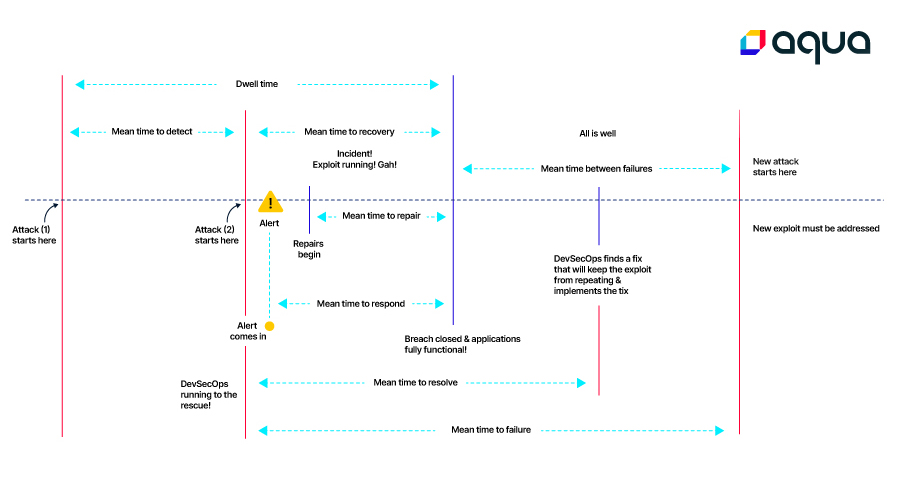
A “good” MTTR is also one that minimizes dwell time (which means, again, the time during which a risk is active in your environment). When you can effectively detect risks quickly using runtime security scanning and monitoring, you can minimize dwell time and, by extension, minimize the window available to threat actors for harming your organization.
Reviewing MTTR data is also an opportunity to understand your organization’s cybersecurity trends. If you notice that MTTR times are trending higher over time, it’s a sign that you may need to improve the efficiency of your risk management processes or adopt new types of tools – like AI-guided remediation solutions – that help your team to fix issues faster.
Benefits of leveraging MTTR
Tracking and analyzing MTTR enable several benefits, which help drive better cybersecurity outcomes.
Improving incident response procedures
When you know your average time to respond to or manage cybersecurity risks, and when you compare how that number changes over time, you can more easily identify pain points within your incident response processes and procedures that slow down operations and increase risk.
For example, you might notice that MTTR for a certain type of security issue (like vulnerabilities) is higher than your overall MTTR. This may be a sign that you could improve the processes you use to manage vulnerabilities. You might benefit from investing in risk-based vulnerability management, for instance.
Enhancing automation for detection and monitoring
Because an organization’s ability to automate processes plays a key factor in MTTR, measuring MTTR is a great way to identify places where you can benefit more from automation in the context of security risk detection and monitoring.
In addition, measuring MTTR allows you to assess the ROI of new automation investments. If you deploy a new type of security tool, you can compare MTTR rates before and after the tool’s adoption to evaluate whether it has helped speed up your team’s ability to manage risks and threats.
Lower risk and breach levels
Having a low MTTR doesn’t guarantee that you won’t experience a cybersecurity breach (nothing can), but in general, the lower your MTTR is, the lower your chances of being breached. That’s because, again, the longer risks remain active, the more time threat actors have to exploit them. Organizations that excel at identifying and remediating cybersecurity issues quickly are less prone to having attackers break into their IT estates.
How to improve MTTR
If you find that your MTTR rates are not where you’d like them to be, the following practices can help improve MTTR:
- Analyze MTTR data granularly: Drill down into your response and recovery data to gain insight into exactly which processes are taking longest or where bottlenecks appear. You may notice, for example, that certain types of incidents take you longer to mitigate than others, which could be a sign that you should improve your processes related to that type of incident.
- Invest in automation: The more you automate processes, the smoother risk response and mitigation are likely to go. To this end, businesses should adopt not just conventional automations, such as automated alerting and patching tools, but also next-generation solutions, like those that use AI to guide remediation.
- Remove manual approvals: Even when workflows are largely automated, they sometimes require manual approval before an operation can begin. Where feasible, removing manual approvals can speed response and remediation times. For instance, if someone must currently sign off on installing a patch to mitigate a vulnerability, consider having your patching tools install patches as soon as they become available.
- Improve team communication: Sometimes, poor MTTR stems not from technical issues, but from communication ones. The more smoothly your teams are able to communicate when responding to and remediating risks and threats, the lower MTTR is likely to be.
Reducing MTTR with Aqua
No matter which types of risks and threats you manage, Aqua provides the features you need to detect, assess, and remediate them quickly. From application vulnerabilities, to insecure configurations, to runtime environment breaches and beyond, Aqua’s broad range of capabilities, including AI-powered detection and response, Drift prevention or vShield (vulnerability Shield patching), allow you to identify incidents of many types, as well as formulate and execute a plan for fixing them – all of which contribute to lower MTTR.
Aqua Cloud Native Application Protection Platform (CNAPP)
Go cloud native with the experts!