What Is VMware Tanzu?
VMware Tanzu is a solution that allows organizations to build, run, and manage applications on Kubernetes, while using familiar VMware concepts and tooling.
Tanzu addresses the challenges of container orchestration and management, particularly in environments where scalability, reliability, and security are critical. It unifies container management with other aspects of modern data centers, such as virtualized environments, streamlining operations and reducing infrastructure complexity. Tanzu bridges the gap between developers, who speak the language of containers, and operations teams, who speak the language of servers and virtual machines.
One of the key aspects of Tanzu is its integration with VMware’s cloud infrastructure, which allows seamless migration and management of applications across different cloud environments. This integration empowers organizations to leverage their existing investments in VMware infrastructure while adopting modern application development practices. Tanzu’s focus on enterprise readiness ensures that containerized applications are built and deployed with high availability, security, and in line with compliance standards.
What Is VMware Tanzu Kubernetes Operations?
VMware Tanzu Kubernetes Operations is a suite of software solutions that help large organizations manage and operate Kubernetes clusters. It provides a unified way to deploy, manage, and secure Kubernetes across multiple cloud environments and on-premise VMware environments. This solution addresses the complexities of Kubernetes by offering tools and services that streamline cluster lifecycle management, including deployment, scaling, and upgrading.
Tanzu Kubernetes Operations provides centralized control and visibility into Kubernetes clusters, regardless of where they are deployed. It integrates with VMware’s existing infrastructure and management tools, allowing IT teams, who are familiar with VMware interfaces and practices, to use the same processes to manage Kubernetes.
Moreover, Tanzu Kubernetes Operations enhances security and compliance. It incorporates built-in security features to protect clusters and offers compliance checks against industry standards.
Tanzu Kubernetes Grid is a core component of Tanzu Kubernetes Operations, which provides a consistent Kubernetes environment that helps organizations run Kubernetes clusters across different cloud platforms. We’ll discuss it in more detail in the following section, among other components of the Tanzu Kubernetes Operations framework.
This is part of a series of articles about container platforms.
In this article:
Components of Tanzu Kubernetes Operations
The key components of Tanzu Kubernetes Operations are illustrated in the diagram below. Let’s review the main components one by one.
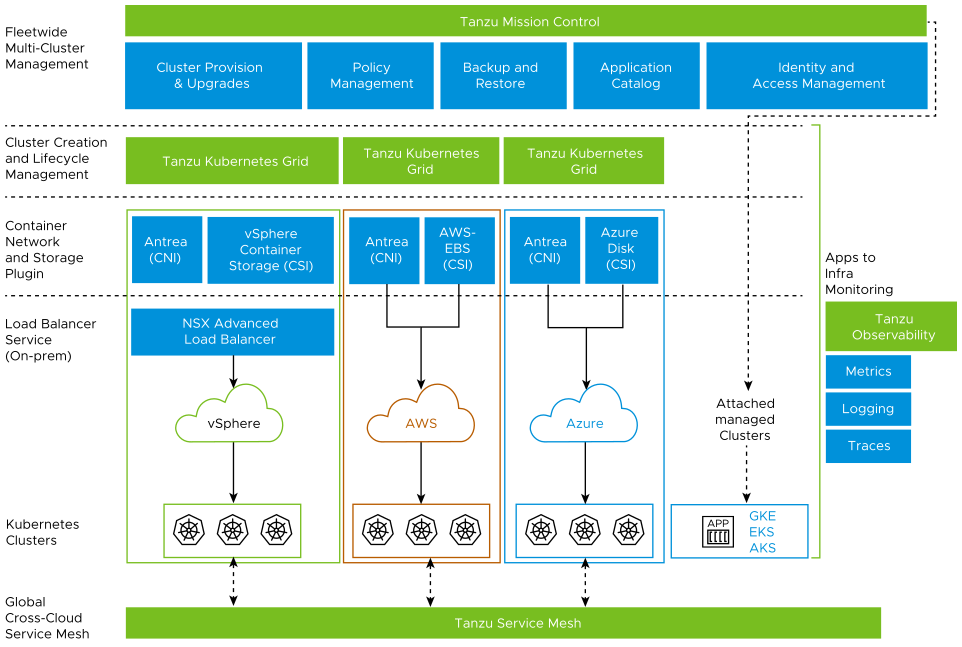
Source: VMware

VMware Tanzu Mission Control
VMware Tanzu Mission Control is a centralized management platform for consistently operating and securing Kubernetes infrastructure and modern applications across multiple teams and clouds. It offers complete visibility and control over every Kubernetes cluster, no matter where it is running. This includes public clouds, vSphere, and edge environments.
Tanzu Mission Control simplifies cluster operations with features like centralized policy management, data protection, and access control. It enables organizations to set policies at a single point and have them enforced across all Kubernetes clusters. This not only enhances security but also ensures consistency in operations.
The platform also provides backup and restore capabilities, ensuring data integrity and minimizing downtime in case of failures. With its comprehensive dashboard, IT teams can monitor the health and performance of all clusters, streamline troubleshooting, and improve overall efficiency.
VMware vSphere with Tanzu
vSphere is VMware’s flagship virtualization solution, used by millions of organizations to manage virtual machines in their on-premise data centers. VMware vSphere with Tanzu bridges the gap between traditional and modern applications, allowing organizations to run Kubernetes clusters directly on the vSphere platform.
This integration allows developers to use Kubernetes in a familiar vSphere environment, simplifying the deployment and management of containerized applications. This means organizations can use their current resources, processes, and expertise to support both traditional VM-based and modern containerized applications.
vSphere with Tanzu also enhances operational efficiency by providing centralized management of both VMs and Kubernetes clusters. IT teams can manage their entire infrastructure through a single pane of glass, improving visibility and control while reducing complexity.
VMware Tanzu Kubernetes Grid
Tanzu Kubernetes Grid provides a consistent, secure, and up-to-date Kubernetes environment across different cloud platforms. This multi-cloud Kubernetes footprint simplifies the deployment and operation of Kubernetes clusters at large scale.
Tanzu Kubernetes Grid is made up of several key components, including signed and certified Kubernetes binaries, a command-line interface (CLI) for cluster creation and management, and cluster lifecycle management. It supports a variety of pre-configured storage and networking solutions, and comes with a robust set of monitoring, logging, and troubleshooting tools. This provides a reliable and scalable platform for running containerized applications.
VMware Tanzu Service Mesh
VMware Tanzu Service Mesh provides connectivity and security for microservices across multi-cloud Kubernetes environments. In addition to basic load balancing, it offers advanced networking, security, and observability features for microservices.
One of the core capabilities of Tanzu Service Mesh is its ability to secure communications between services with mTLS (mutual Transport Layer Security). This ensures that sensitive data transmitted between microservices is encrypted and secure from external threats. The service mesh also allows for fine-grained policy enforcement, controlling which services can communicate with each other.
Tanzu Service Mesh also offers observability features. It provides detailed insights into the performance and health of microservices, aiding in the quick identification and resolution of issues. This helps maintain the reliability and performance of complex, distributed environments.
Related content: Read our guide to container as a service
Key Characteristics of Tanzu Kubernetes Clusters
Let’s explore how Tanzu sets up Kubernetes clusters to ensure they are easy to operate across multiple cloud environments.
Opinionated Installation of Kubernetes
Tanzu uses an ‘opinionated’ installation of Kubernetes. This means that VMware has made certain design and configuration decisions in the setup of Kubernetes in Tanzu. The idea is to provide an optimized installation process that reduces the complexity typically associated with setting up a Kubernetes cluster.
The Tanzu Kubernetes installation incorporates best practices and lessons learned from years of supporting Kubernetes deployments in a wide variety of environments. This opinionated installation not only simplifies the setup process but also ensures a high level of performance, reliability, and security.
Integrated with the vSphere Infrastructure
Tanzu Kubernetes clusters are fully integrated with vSphere infrastructure. This integration allows you to leverage the existing vSphere features and capabilities, such as high availability, dynamic resource scheduling, and vMotion, in your Kubernetes clusters.
This deep integration with vSphere also simplifies the management of Tanzu Kubernetes clusters. You can use the familiar vSphere Client interface to monitor and manage your clusters, reducing the learning curve and increasing efficiency. Moreover, this integration enables easy migration of workloads between vSphere and Tanzu Kubernetes clusters.
Production Ready
Tanzu Kubernetes clusters are production-ready. They come with all the necessary components and configurations needed to run enterprise-grade applications. This includes networking and storage solutions, security features, monitoring and logging tools, and more.
VMware also ships Tanzu Kubernetes clusters with popular cloud-native technologies, such as Helm, Prometheus, and Fluentd. This allows businesses to leverage these tools in their Tanzu Kubernetes clusters seamlessly, simplifying application deployment and management.
Fully Supported by VMware
Tanzu Kubernetes clusters are fully supported by VMware. This means that VMware’s world-class support team can help with any issues you encounter with your clusters. VMware provides comprehensive documentation, training, and professional services to help you get the most out of your Kubernetes clusters.
Based on Open Source Kubernetes
Finally, Tanzu Kubernetes clusters are based on the familiar open source Kubernetes. This means that you can use the standard Kubernetes APIs and command-line tools to interact with your clusters. This familiar interface makes it easy for developers and operations teams to work with Tanzu Kubernetes clusters.
This also means that Tanzu Kubernetes clusters are compatible with the broader Kubernetes ecosystem. You can use any Kubernetes-compatible tool or service with your Tanzu Kubernetes clusters, providing flexibility and preventing vendor lock-in.
Tanzu Kubernetes Grid Cluster Components
Let’s zoom into the components that make up a Kubernetes cluster in Tanzu Kubernetes Grid.
Authentication Webhook
The Authentication Webhook is responsible for authenticating and authorizing user requests to the Kubernetes API server. It uses a set of rules to determine whether a request should be allowed or denied. These rules can be customized to fit the specific security requirements of your organization.
This component is vital in maintaining the security of your Tanzu Kubernetes environment, as it ensures only authorized users can access and make changes to your Kubernetes resources.
Container Storage Interface Plugin
The Container Storage Interface (CSI) Plugin allows Tanzu Kubernetes to interface with a wide variety of storage systems, including both traditional storage systems and cloud-native storage solutions.
The CSI Plugin allows Kubernetes to dynamically provision and manage storage resources for your containerized applications. It ensures that your applications have access to the storage resources they need, when they need them, regardless of the underlying storage system.
Container Network Interface Plug-in
The Container Network Interface (CNI) Plug-in is responsible for managing the networking resources of your Kubernetes environment. The CNI Plugin enables Tanzu Kubernetes to interface with a wide variety of network solutions, both traditional and cloud-native.
This plug-in creates a flexible and scalable network architecture for your containerized applications. It also provides network isolation between different applications, ensuring the security and integrity of your data.
Cloud Provider Implementation
This component allows Tanzu Kubernetes to interface with various cloud providers, enabling you to run your Kubernetes workloads on any cloud platform of your choice.
The Cloud Provider Implementation is responsible for provisioning and managing resources on cloud providers like AWS and Azure, including compute instances, storage volumes, and networking resources.
Aqua Cloud Native Application Protection Platform (CNAPP)
Go cloud native with the experts!