Securing Production K8s Clusters in AKS
What Is Azure Kubernetes Service (AKS) Security?
Azure Kubernetes Service (AKS) is a container platform that offers simplified Kubernetes deployment in Azure. It is a fully-managed service that manages Azure-based Kubernetes clusters. This service, however, does not handle all security responsibilities.
AKS handles control plane maintenance and health monitoring, but you, as the Kubernetes administrator or operator, need to manage and maintain worker nodes.
AKS asks you to define how to create and manage clusters and set up security for your clusters. You are responsible for secure configuration, and building security into the architecture using best practices that protect your clusters and pods. You are also responsible for secure network communication within your cluster.
In this article:
Baseline Security for Azure Kubernetes Service (AKS)
Let’s review how to secure production Kubernetes clusters using AKS built-in security features and policies. For more detailed guidelines on securing AKS clusters, see the Center for Internet Security (CIS) Benchmark for Azure AKS and the Microsoft AKS Security Baseline.
Cluster and Pod Security
Azure provides predefined security policies you can use to improve the health and security posture of AKS clusters and pods. These include:
- OPA Gatekeeper—a key best practice is to limit access to container operations and prevent root/privilege escalations. An Azure Policy add-on for AKS lets you install a managed instance of Gatekeeper, an open-source Kubernetes admission controller. Gatekeeper checks each request that involves creating or updating a resource.
- Initiatives—an initiative is a set of policies that support an organization’s compliance goals. There are currently two built-in initiatives: baseline and restricted. Both can help you lock down host file system, networking, and ports.
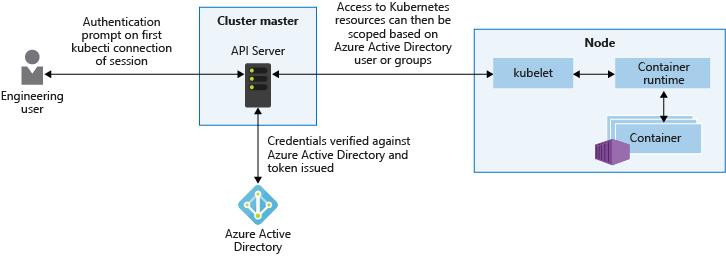
- Protect access to API server—Kubernetes RBAC can integrate with Azure Active Directory (AD) or other identity providers. This allows fine-grained access, similar to how you control access to other Azure resources. It also lets you perform logging and auditing on all API server operations.
The diagram below illustrates how to protect access to the API server using Azure AD:
Network Security
Just like AKS provides built-in security policies for clusters and pods, it also provides ready-made policies for Kubernetes networks. Here are some of the primary policies you can use:
- Filtering network traffic—use policies that only allow network traffic from authorized networks based on IP address or namespace.
- Ingress controllers—leverage ingress controllers to control access to internal IP addresses, meaning that internal IPs are accessible only from your internal network.
- Network security groups—achieve finer-grained control by applying security groups to AKS resources, allowing specific ports and protocols based on source/destination. By default, AKS creates a subnet-level security group for your cluster. Security groups change automatically when you add services such as load balancers, port mappings, and ingress routing.
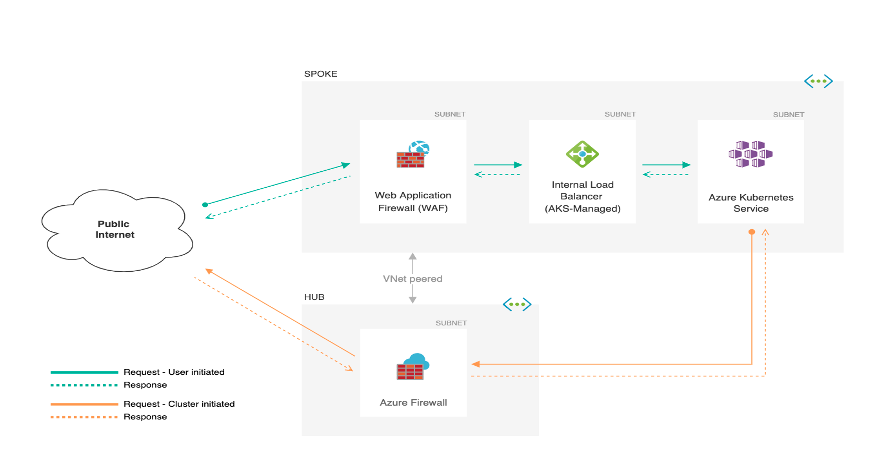
- Web application firewall (WAF)—leverage the Azure WAF solution, together with an egress firewall, to manage predefined routes in and out of an AKS environment.
The diagram below shows how to deploy a WAF and egress firewall to protect an AKS cluster.
Regularly Update to the Latest Version of Kubernetes
Kubernetes regularly releases updates, including new features, bug fixes, and security fixes. The update release cycle is built to enable a quicker pace than traditional infrastructure platforms. Here is how the process generally works:
- AKS Preview—new features and fixes move through these phases before becoming stable.
- Generally available—features and fixes that become stable are made generally available and suitable for production.
This update release cycle enables you to update your Kubernetes version without experiencing breaking changes or having to adjust your templates and deployments.
Kubernetes releases minor version updates periodically. AKS supports three minor K8s versions, retiring support for old minor versions and patch releases when Kubernetes introduces new minor patch versions.
You must update Kubernetes to the latest version to ensure the security of your AKS cluster. You can set up a governance system to look for necessary upgrades and ensure you continue using supported versions.
Secure Your Cluster with Azure Policy
You can use Azure Policy to set up and enforce your Azure Kubernetes Service (AKS) cluster security policies. Azure Policy allows you to enforce industry standards and organizational policies, helping you evaluate your organization’s compliance. Once installed, the Azure Policy add-on for AKS lets you apply policy definitions, either in groups (policy sets) or individually, to your cluster.
Installing the Azure Policy Add-On for AKS
Before you install the Azure Policy add-on or enable any of its features, you must ensure your subscription supports resource providers for Microsoft policy insights:
1. Ensure you’ve installed and set up Azure CLI (version 2.12.0 or later). Run the az –version to check the version. If necessary, install or update the Azure CLI.
2. Register the preview features and resource providers:
- For the Azure portal, register your Microsoft.PolicyInsights providers.
- For Azure CLI, use Cloud Shell or the az login to login and enter the Microsoft.PolicyInsights namespace for the provider register.
3. If you installed limited definitions for preview policies, go to the Policies page and use the Disable button to remove the add-on on the AKS cluster.
4. Make sure the AKS cluster is version 1.14 or above. To check the AKS cluster version, use this script:
Use az login unless using Cloud Shell
# Search the value in the kubernetesVersion
az-aks list
5. Install Azure CLI (2.12.0 or above). See the Install the Azure CLI page for further information.
Once you’ve completed the prerequisite steps above, you can install the Azure Policy add-on in your chosen AKS cluster:
- In the Azure portal:
- Select All services to launch the AKS service and search for/select your Kubernetes services.
- Choose an AKS cluster.
- Click on Policies under Kubernetes services.
- Click on Enable add-on on the main page.
- For the Azure CLI, enter the following script:
# Log in with az-login unless Cloud Shell is used
az-aks to enable-addons --addon azure-policy --MyAKSCluster name --resource-group is ResourceGroup1
Use this command to verify if the add-on installed successfully and ensure the Gatekeeper and Azure Policy and pods run correctly:
# look for azure-policy pods installed in the kube-system namespace
kubectl to get pods in the kube-system
# look for gatekeeper pods installed in the gatekeeper-system namespace
kubectl to get pods in the gatekeeper-system
- Finally, use the following CLI command to check if the last add-on was successfully installed, specifying the name of your resource group and AKS cluster:
az aks to show --query addonProfiles.azurePolicy -g <RESOURCE GROUP> -n <CLUSTER NAME>. Aqua Cloud Native Application Protection Platform (CNAPP)
Go cloud native with the experts!