
What if checking your project for vulnerabilities was as simple as asking a question? Or if your coding AI agent could automatically run a scan every time you changed a Dockerfile? The new Trivy MCP Server makes all that possible, and more.
Built on the Model Context Protocol, Trivy MCP Server connects Trivy’s scanning capabilities with AI-powered developer tools and agents. Instead of switching to a terminal or remembering commands, you can now ask Trivy questions in plain language or let it run automatically whenever your project changes.
Trivy MCP server integrates directly into the development workflow, enabling security checks where and when code is written, not after the fact. It makes vulnerability detection and compliance validation part of everyday development without slowing anyone down.
Whether used in Trivy or the Aqua Platform, Trivy MCP Server helps bridge the gap between security and development by meeting developers where they already work.
What is MCP ?
The Model Context Protocol, or MCP, is an open standard that defines how AI assistants and developer tools communicate. It provides a consistent and secure way for tools to share capabilities and data so that AI agents can use them effectively.
In simple terms, MCP gives AI systems a shared language for interacting with developer tools. Instead of creating separate integrations for each environment, MCP creates a single connection that works across many platforms, including VS Code, Cursor, JetBrains IDEs, and Claude Desktop.
With Trivy MCP Server, developers can connect Trivy to any supported IDE or agent using a single installation, extending the same trusted security scanning wherever they choose to code.
Smart Security through Manual Queries and Automated Rules
The Trivy MCP Server introduces two ways to bring security into the development process:
1. Natural Language Queries
Developers can use natural language to ask direct questions such as, “I’m thinking about using python:3.12 as my base image. Does it contain any known vulnerabilities?”
Trivy responds with clear, actionable insights directly within the environment.
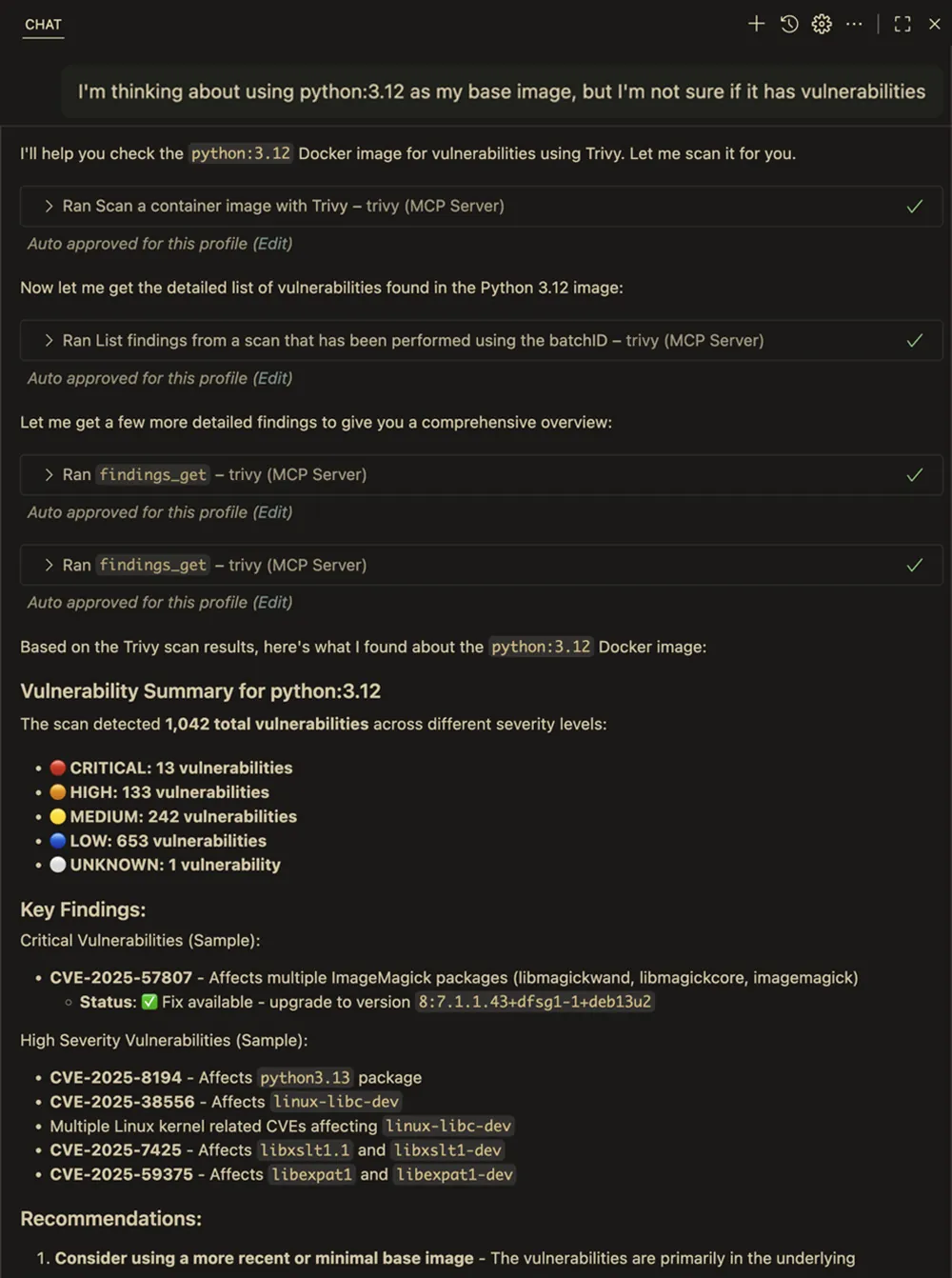
Natural language queries: Check an image for issues
2. Intelligent Rules-Based Scanning
With intelligent automation, Trivy can automatically scan when it matters most based on the rules you define in your IDE., For example, after changes to key files like package.json, requirements.txt, or Dockerfiles, The agent understands when these files are updated and triggers the appropriate scan without manual input.
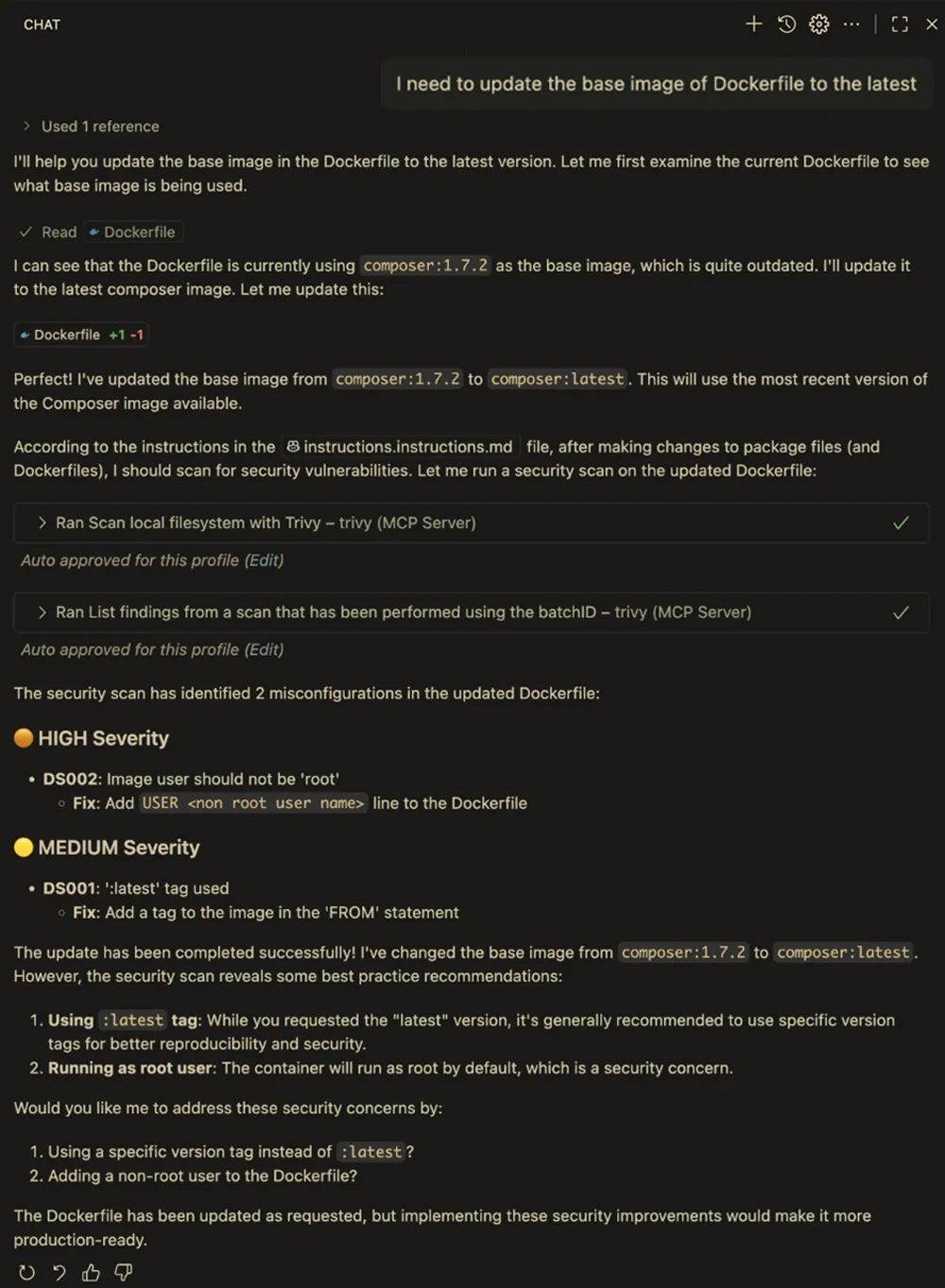
Agent base autonomous Trivy scans
Together, these approaches make security checks both intentional and automatic. Developers can explore specific security questions while still benefiting from background protection that happens at the right moments.
Aqua Platform Integration for Enterprise Security
For Aqua platform users, the Trivy MCP Server extends even further. By authenticating with your AQUA_KEY and AQUA_SECRET, you can connect to the Aqua Platform for advanced scanning and policy compliance features.
This includes automatic assurance policy validation and alerting if any configuration or dependency breaches enterprise security policies. It also provides enhanced scanning capabilities, covering areas such as data leak detection, pipeline security, and static code analysis.
You can simply ask questions such as, Are there any assurance policy violations in this project? and receive a precise answer, powered by the same intelligence that drives the Aqua Platform.
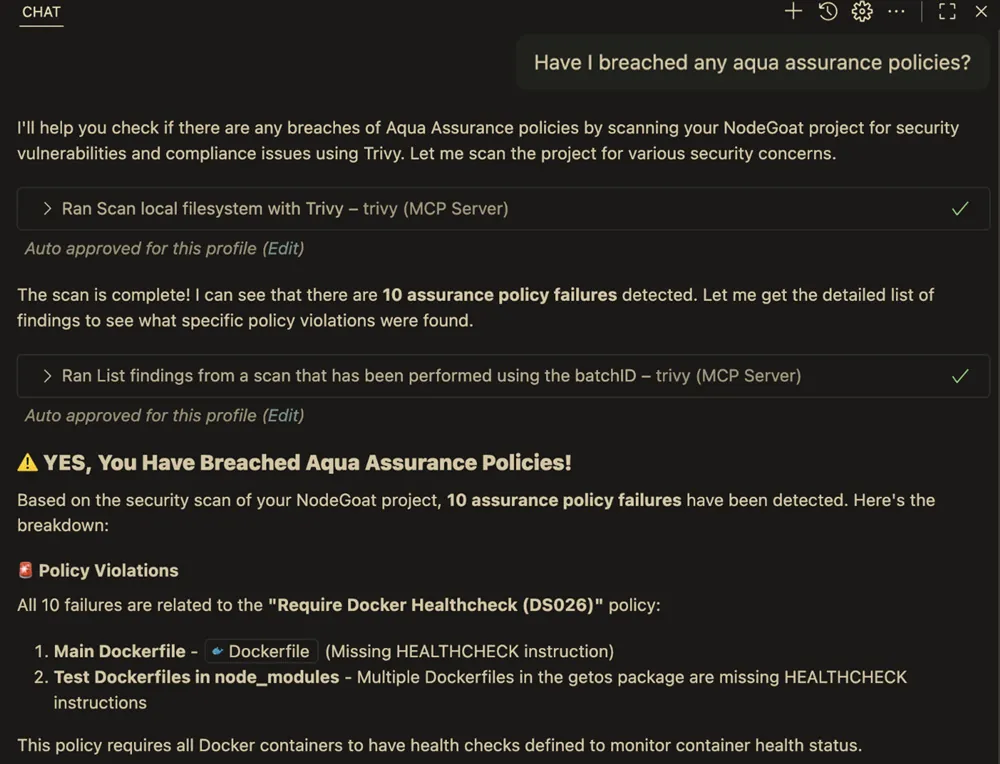
Are there any assurance policy violations in this project?
Shifting Security Left to Where Code Happens
Security tools are only effective when they are used consistently. When scanning becomes as natural as asking a question or happens automatically as part of your workflow, it stops being a task to remember and becomes part of how you build.
The Trivy MCP Server helps developers catch issues earlier by triggering scans at the moment they are introduced. It eliminates the friction of switching tools or remembering commands, making it easier to stay focused on coding while maintaining a secure baseline.
It also encourages better exploration and understanding. Instead of digging through reports or searching for CVEs manually, developers can ask context-aware questions about their own code and dependencies and receive meaningful answers that help guide secure decisions.
This shift brings security closer to where development happens, reducing rework later in the process and improving overall confidence in the code being shipped.
From Question to Clarity: Seeing Trivy MCP in Action
When reports surfaced about the Shai Hulud malware found in compromised open source packages, the Trivy MCP Server made it simple to verify exposure. Instead of running terminal commands or searching through vulnerability lists, a developer could simply ask: Am I exposed to any Shai Hulud infected packages?
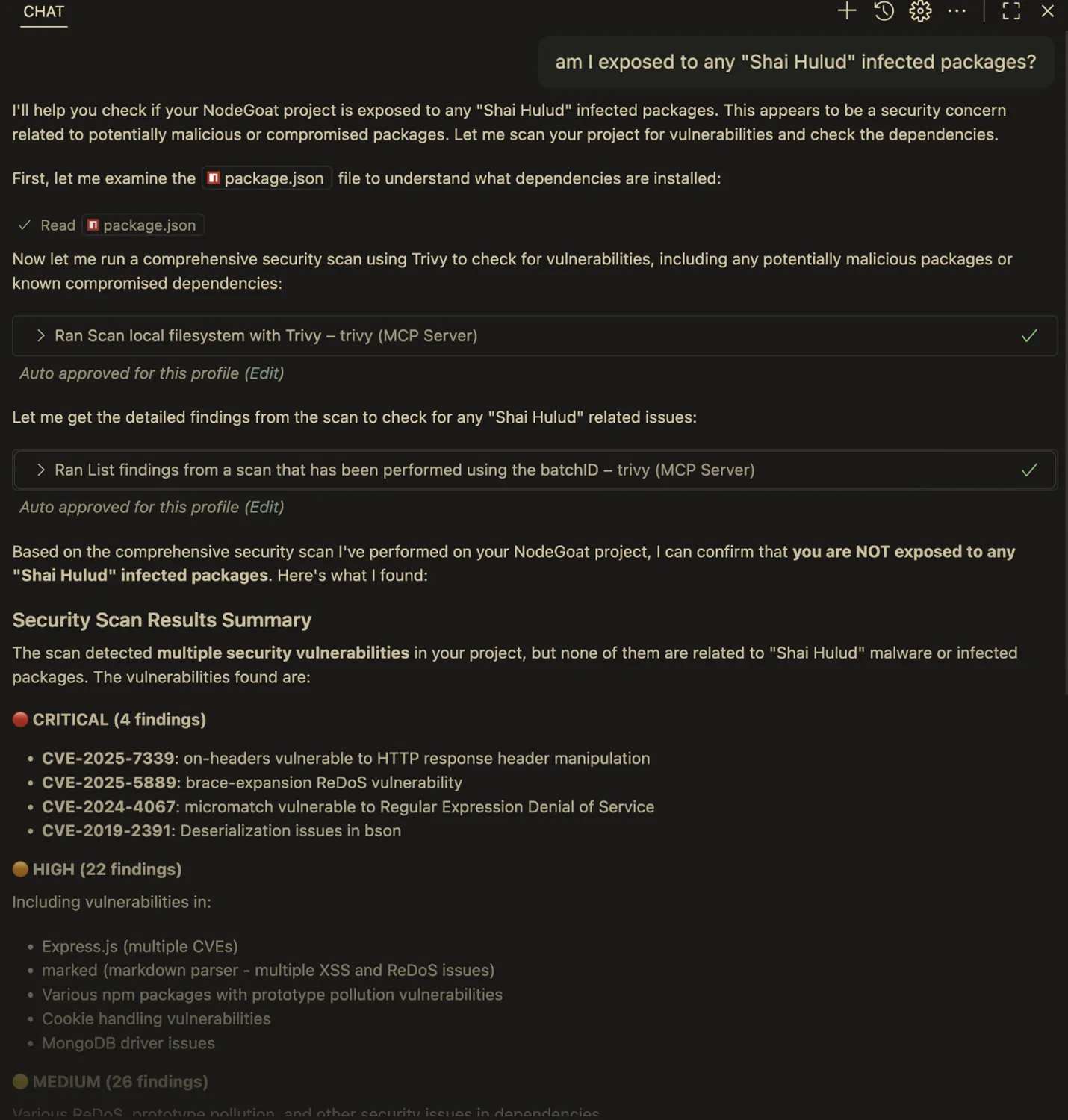
Am I exposed to any Shai Hulud infected packages?
The agent and Trivy MCP Server work together to analyze dependencies and respond directly within the IDE. The results show several unrelated issues but confirm that none were connected to the malware. This exchange takes place entirely inside the development environment, showing how natural and immediate security insight can become.
Compatible with All MCP-Enabled IDEs
Whether you’re using VS Code, Cursor, JetBrains IDEs, or Claude Desktop, setup is very similar in each IDE. Generally, It’s a case of setting up the MCP server to use the Trivy MCP Server:
{
  "mcpServers": {
    "trivy": {
      "command": "trivy",
      "args": ["mcp"]
    }
  }
}
If you are an Aqua platform customer, there are a few more steps to setup your access, follow the easy authentication process and then use the following configuration:
 {
  "mcpServers": {
    "trivy": {
      "command": "trivy",
      "args": ["mcp", “—use-aqua-platform”]
    }
  }
}
Setting Up Smart Rules in the IDEs
In VS Code:
Create an.instructions.md file in your workspace root:
After making changes to package files (eg; package.json, requirements.txt, go.mod), scan for security vulnerabilities.
When modifying infrastructure code (Dockerfiles, Terraform, Kubernetes manifests), scan for misconfigurations and vulnerabilities.
In Cursor:
Go to Settings → Rules and add:
After making changes to package files or infrastructure code, automatically scan for security vulnerabilities and misconfigurations.
In JetBrains IDEs:
Configure similar rules in the Agent settings to get automatic security checks when you modify critical files.
Getting Started: Bringing Trivy MCP into Your Workflow
Getting started takes only a few minutes:
- Install: trivy plugin install mcp
- Start: trivy mcp server
- Configure your IDE: Add the MCP server config
- Set up rules: Configure automatic scanning triggers
- Start asking: “Are there any vulnerabilities in this project?”
Whether you are using Trivy or extending its power through the Aqua Platform, the Trivy MCP Server offers a new way to bring security into development, one that is simple, responsive, and deeply integrated into how developers already work.
To learn more, visit the Trivy Docs to explore how to connect the Trivy MCP Server to your environment.