
Kaiji has been exploiting Linux-based servers and IoT devices for years. But what started as a relatively straightforward threat has evolved to become dramatically more sophisticated, employing stealthy persistence measures to stay hidden and stay planted.
When dealing with a threat like Kaiji, it’s important that defenders keep pace with the tactics employed. Aqua’s Runtime Protection capabilities enable organizations to protect their environments against threats like Kaiji by detecting distinct indicators like rootkit activity and persistence measures. Additionally, Aqua can block container drift and fileless execution at runtime, preventing Kaiji from taking hold.
Step-by-Step Guide
1. Create a Runtime Policy
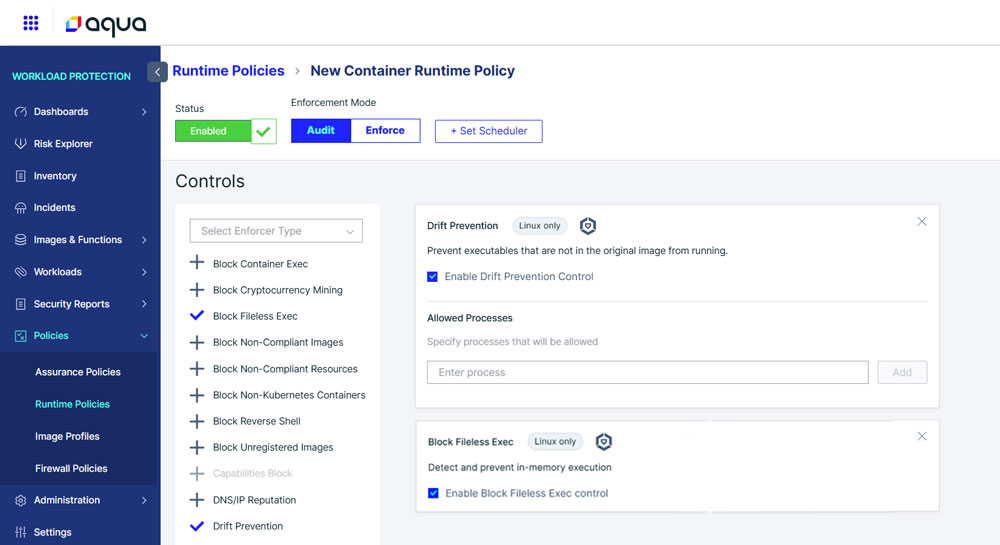
Log in to the Aqua console and go to Workload Protection > Policies > Runtime Policies.
2. Add a Container Runtime Policy
Click Add Policy, give it a name, and choose Container Runtime Policy from the list.
3. Enable Key Runtime Controls
Check protections like:
- Block Fileless Execution
- Drift Prevention
4. Set the Enforcement Mode –
Set the Enforcement Mode to Audit to monitor activity or Enforce to actively block malicious behavior.
For more prevention and remediation strategies, including Aqua’s Runtime Protection Policies, visit our Support Portal.
Kaiji’s Invisible Grip: How Persistence and Deception Keep It Alive
Kaiji’s authors have invested tremendous effort into staying on machines once they’ve gained access. Rather than a quick smash-and-grab, the malware plants itself in everyday, innocuous locations and wires those copies to start automatically after reboot. So even if someone restarts the server, Kaiji has already arranged to come back.
Part of that stealth is bluntly social: it doesn’t try to outrun an expert with flashy tricks, it simply changes the way the system reports itself so casual inspections look normal. For example, Kaiji drops a small startup script that quietly intercepts the common administrative commands people use to check running programs or open network connections. It then removes any lines that would reveal the malware’s files or processes, effectively editing the system’s “mirrors” so the reflection no longer shows the intruder.
The result is practical and worrying: when this much energy is invested into building hiding and persistence measures, cleanup and detection becomes that much harder. Defenders need to treat unexpected startup entries, odd scheduled tasks, or signs that basic tools have been tampered with as red flags – those are the breadcrumbs that point to a deeper, persistent infection.
To learn more about the anatomy of Kaiji Malware and what you can do to protect your workloads against it,
read our blog Kaiji Malware: Anatomy, Persistence and Detection.
Don’t wait for an attack to reveal the gaps
Contact your Aqua Sales Representative or Customer Success Manager today to learn how
Aqua runtime security helps to protect against real-world malware like Kaiji.